Rank One Pro
← Back to Rank One Pro

Register for a Camp

Rank One Pro · Last updated May 8, 2026

This tutorial explains how parents and guardians can register and pay for camps online through the Rank One camp registration system.

Tip: If you do not have the registration link for your district's camp registration website, please contact the district Athletic Department.

Part 1: Find and Select a Camp

1 Select Your School

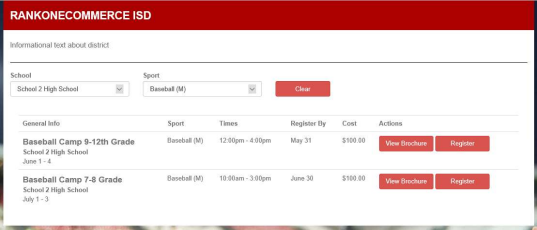
On your district's Camp Registration website, select the School from the drop-down list. When you find the camp you would like to sign up for, click Register.
School and sport selection drop-down menus with camp list

Select a school and sport to view available camps.

2 Select a Sport and Browse Camps

Select the Sport from the drop-down list. All camps pertaining to the selected school and sport will populate below.

  • Sports marked with (M) are Male sports (e.g., Basketball (M) = Men's Basketball)
  • Sports marked with (F) are Female sports (e.g., Basketball (F) = Women's Basketball)
  • Sports marked with (C) are Co-Ed sports (e.g., Tennis (C) = Co-Ed Tennis)

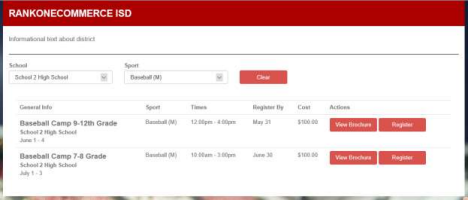
To see more information about a camp, select View Brochure for additional camp details. To sign up, select Register.
Camp list showing View Brochure and Register buttons

Browse available camps and click Register to sign up.

Part 2: Complete the Registration Form

3 Enter Camper Information

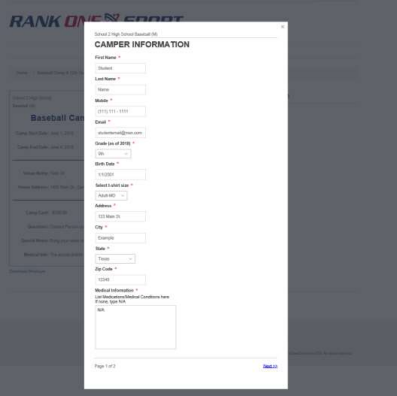
Enter the Camper Information (your student's information) on page 1 of the registration form. When complete, select Next at the bottom of the page to continue to page 2.
Camper information form with fields for name, email, grade, address, and medical information

Fill in the student's personal and medical information.

4 Enter Parent/Guardian Information

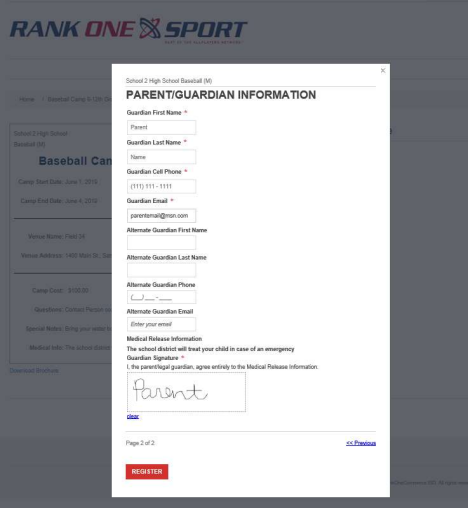
Enter the Parent/Guardian Information and sign the Medical Release Information Statement. When all information is entered, select Register.
Parent/Guardian information form with guardian details and medical release signature

Complete the guardian details and sign the medical release.

Part 3: Shopping Cart and Payment

5 Review the Shopping Cart

You will be directed to the Shopping Cart where you can register for additional camps or complete your registration and payment.

  • To register the same student for an additional camp, select "Add Another Registration for (your student's name)".
  • To register another child for a camp, select "Register Another Camper".
  • To remove a camp registration, select Remove.
  • If you have a discount code, enter it in the Discount Code box and click Apply.
Important: Not all districts or camps offer discount codes. Only enter a code if one has been provided to you by the district.

When you are ready to complete your registration(s), place a check in the box to agree to the Terms & Conditions and select Checkout.
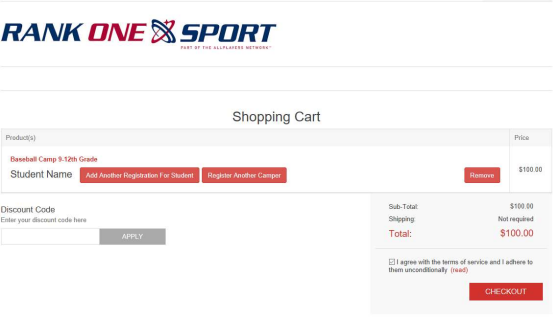
Shopping cart showing registered camp, discount code field, and checkout button

Review your cart, apply discount codes, and proceed to checkout.

6 Complete the Checkout Process

Complete the four-step checkout process:
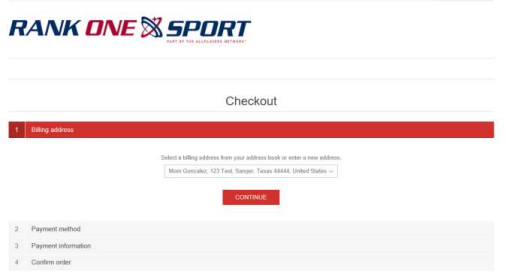
  1. Billing Address: Your billing address will populate from the registration form. To update it, click the down arrow and select "New Address". Click Continue.
  2. Payment Method: Select how you would like to pay. Click Continue.
  3. Payment Information: Review or enter your payment information. Click Continue.
  4. Confirm Order: Review your order and click Submit to complete the registration.
Checkout page showing billing address, payment method, payment information, and confirm order steps

Complete billing, payment, and order confirmation.

7 Registration Confirmation

You will receive a confirmation message and an order number after completing the registration. You will also receive an email confirmation.
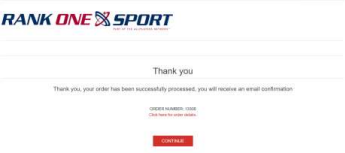
Thank you confirmation page with order number

Your registration is complete. Save your order number for reference.

Tip: For additional help with registering your student for camp, please contact the Athletic Department at your student's school.