To meet state requirements and exceed HIPAA and FERPA standards, Rank One has created a secure messaging feature. Messages can be sent from the Rank One website or the Coach/Admin App. This feature replaces the previous email and text options.
Part 1: Access the Messaging Feature
1
Open Messages
Log into the Rank One website and select Messages. The Messages link is available in two locations on the dashboard.

The Messages link appears in the top navigation area.
2
Compose a New Message
Select Compose Message from the Inbox screen to begin creating a new secure message.

Click Compose Message to start a new message.
Part 2: Select Recipients and Send
3
Select the Recipient Group
Select the group you would like to send a message to: Employees or Rosters (Players & Parents).
4
Define the Recipients
Use the filter options to define the specific group that should receive the message. There are multiple options:
- All students on multiple rosters: Select just the school, then click Search.
- All students in a sport (e.g., all football rosters): Select the school and sport, then click Search.
- Students at a particular level (e.g., Varsity only): Select the school, sport, and level, then click Search.
Tip: You can also filter by Eligibility status (All, Eligible, or Non-Eligible) and by Team for more targeted messaging.

Use the filter drop-downs to narrow your recipient list.
5
Compose and Send the Message
After defining your recipients:
- Click the Search button -- all matching students will appear below.
- Enter a Subject line.
- Enter the Message details.
- Choose to send to Players, Parents, or both.
- Click the Send button.
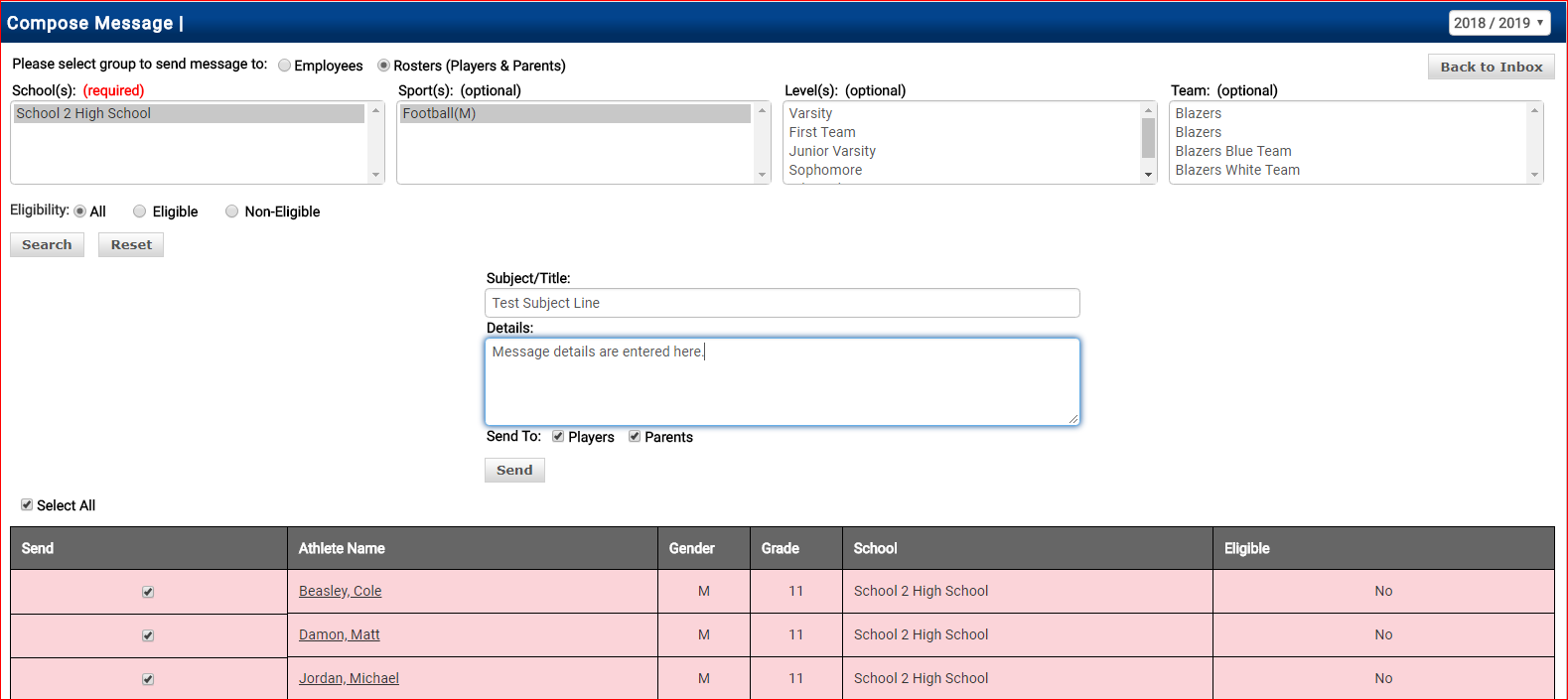
Fill in the subject and message, select recipients, and click Send.
Important: In order for students to receive secure messages, they must download the free Parent/Public Rank One App. Search your app store for "Parent/Public Rank One" to find and install it.
Tip: Once a message has been sent, students and parents will receive a push notification if they have downloaded the Parent/Public Rank One App. Parents with an account can also log in to view messages on the website. Messages can also be sent via the Rank One App -- see the "Messaging Feature Tutorial (APP)" for those instructions.
 Rank One Pro